Skip to content
Compazz

Sell your way

Digital ProductsSocial Checkout

Run your business

POS & InventoryPharmacy POSSupermarket POS

Grow with AI

Compazz AICompazz Credit

The Compazz platform

One business.
Everything connected.

By IndustryPharmacies & ChemistsSupermarketsRetail storesSalons & BarbershopsConsultants & Coaches
ShopPartners
Sign inStart for free

Compazz for pharmacies

Protect your profit.
Care for every patient.

Expired stock. Short tills. Patients you never follow up. Bring the money side and the care side of your pharmacy together with Compazz.

Book a demo Explore patient care

15-minute walkthrough · No commitment to buy

Your pharmacy, connected
Workflow overview

The sale matters.
So does what happens next.

Before the sale

Check stock, expiry and selling prices.

At the counter

Know the patient. Record the dispense.

After the visit

Follow up. Review the day’s cash.

One connected routine for stock, sales and patient care.

Protect profitPatient careCompare your workflowFor pharmacy networks

A busy pharmacy can still be losing money.

You work hard for every sale. Compazz helps you see what is eating into it, so you can act while there is still something to protect.

01

Keep stock from becoming a write-off.

Medicine on the shelf is money you have already spent.

Review recorded expiry dates, low stock and slow sellers. Check what needs attention before placing the next order.

Buy with a clearer view of what will move.
02

Know where the day’s money went.

A busy till means little if closing cash does not add up.

Compare expected and counted takings. Review staff-linked sales, refunds, voids and stock adjustments when something looks wrong.

Follow up on differences with records in hand.

03

Protect the margin on each sale.

A higher supplier price can quietly eat your profit.

Compare recorded costs and selling prices, review product margins and control which staff can discount or change prices.

See the products and decisions squeezing profit.

Loss checks with records behind them

Spot the pattern.
Open the evidence.

Compazz’s loss checks flag repeated cash shortages and unusual refunds or voids, with the underlying receipts and shift records to review. Pricing reports also highlight items below their recorded cost.

Loss checks are included in Pro and Chain. Your team reviews each flag and records the outcome.

Cash
Repeated closing shortages
Staff activity
Unusual refund or void patterns
Margins
Prices below recorded cost

Patient care, built into the pharmacy

Become the pharmacy that remembers them.

A patient is more than today’s receipt. Make their next visit easier, keep their history close and give your team a practical way to follow up.

Remember the patient behind the purchase.

Give your team the context for the next visit, without searching through a notebook or starting the conversation again.

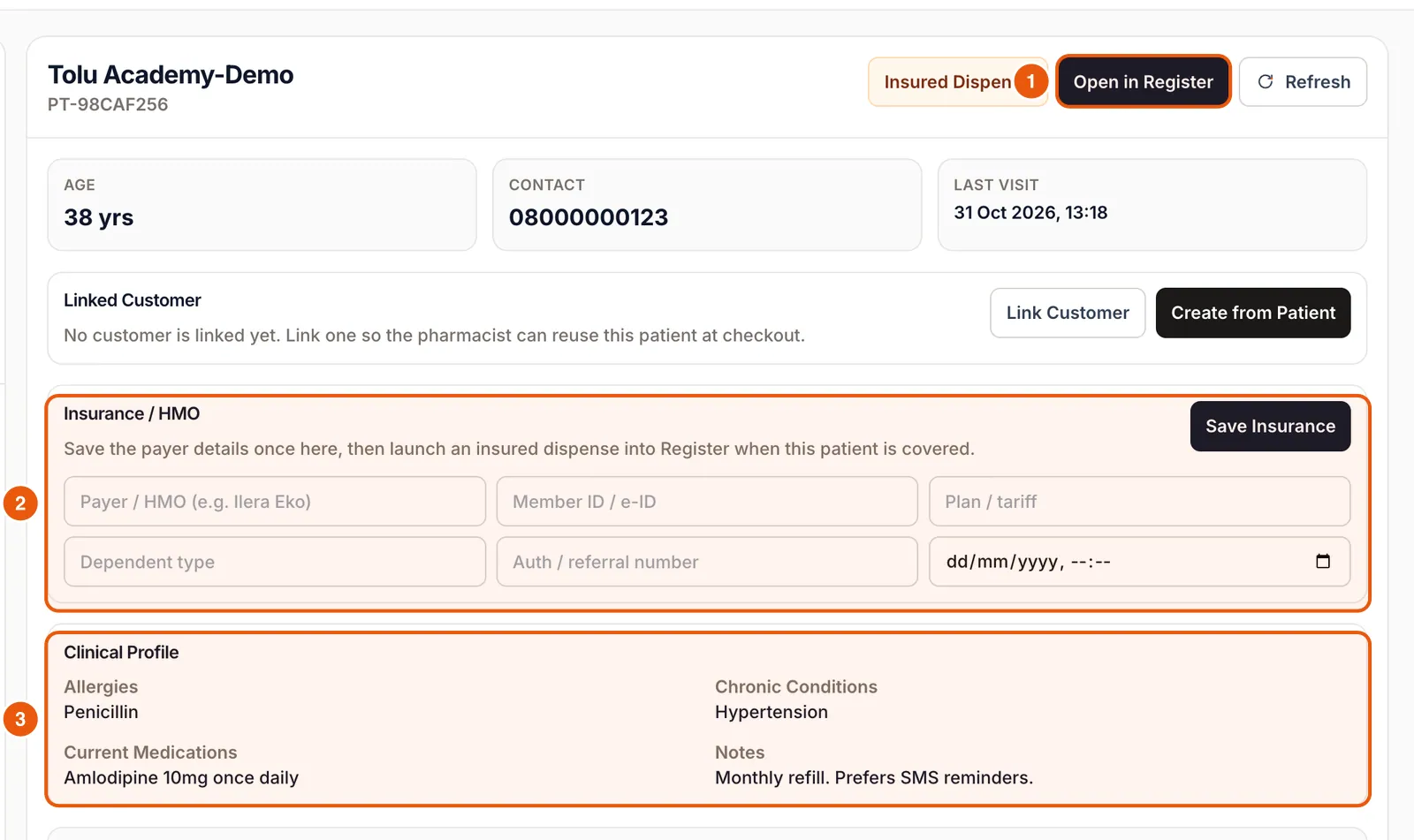
  • Search by patient name, phone number or patient code, with access controlled by staff permissions.
  • Keep contact details, date of birth, allergies, chronic conditions and current medicines together.
  • Add notes and review patient-linked purchase and dispensing history.
See the patient-care walkthrough
Compazz patient record with contact details, linked customer, insurance information and clinical profile.
Product walkthrough · the patient recordView full screenshot (opens in a new tab)

Patient history and follow-up workflows need an internet connection. Your pharmacist enters and reviews clinical instructions; Compazz keeps the records organised.

Already using pharmacy software?

Make the comparison practical.

Bring these five questions to the demo. See the workflow, ask your team to try it, and judge the difference for yourself.

Five questions to evaluate Compazz against your current pharmacy workflow
Ask your current processSee it in Compazz
Can I see which stock needs attention?Review the expiry window, low-stock items and slow sellers.
Can I explain a short till?Compare expected and counted cash, then review the related staff activity.
Can I see the patient’s story?Open their profile, recorded vitals, purchases and dispensing history.
Can my team follow up after dispensing?Set a follow-up date, find it in Refills Due and open a WhatsApp message.
Can I keep an eye on more than one branch?Switch between authorised outlets and review sales and separate branch stock.

Compare with your actual system. Features, outlet limits and staff access depend on your plan and setup.

For pharmacy groups, networks & alliances

Give your members something they can evaluate.

Start with the everyday work of one representative pharmacy. Agree what better stock control, clearer cash records and more consistent patient follow-up should look like before discussing a wider rollout.

Arrange a network walkthrough
  1. 01

    Bring your real workflow

    Choose an owner and pharmacist. Bring the stock, cash and patient-care questions your current process leaves unanswered.

  2. 02

    Watch it work, step by step

    Review an expiry list, a cash difference, a patient record and a refill follow-up in the demonstration.

  3. 03

    Agree the next step

    Discuss a pilot pharmacy, training, access and the checks that would justify a wider rollout.

Simple to start. Clear to budget.

Your team runs the pharmacy.
We help with the setup.

Familiar tasks. Clear buttons.

If your team can send a WhatsApp message, they have a starting point. We help prepare the product list, set staff access and walk through a sale with them.

Settle the subscription for 12 months.

Choose annual billing and plan the year ahead. Confirm your outlets, staff, hardware and setup needs with us so you know the full cost before committing.

View plans

Before you decide

Clear answers.
A better decision.

We already have pharmacy software. Why look at Compazz?

Use the five checks above to compare the work your team does every day. Compazz brings stock, cash controls and patient-care workflows together. In the walkthrough, test the areas your current process makes difficult and decide whether the difference is useful to your pharmacy.

What is included in patient care?

Patient profiles, allergies, conditions, current medicines, notes, vitals history, patient-linked purchases and dispensing, pharmacist-entered instructions, medicine labels, refill and follow-up dates, in-app alerts, manual WhatsApp follow-up links, and HMO details for insured checkout. Detailed patient records and follow-up workflows need internet access. Your pharmacist remains responsible for clinical decisions and the instructions entered.

Are WhatsApp refill messages sent automatically?

The current workflow lets staff open a pre-filled WhatsApp message, review it and send it themselves. Optional in-app follow-up alerts work while Compazz is open. Automatic background WhatsApp or SMS delivery is not included in this workflow.

Can we sell when the internet goes off?

Yes. After the desktop POS is set up online and products and staff sign-ins are saved on the device, ordinary counter sales can continue offline and upload when the connection returns. Patient history, HMO workflows and branch transfers need a connection. Your computer and printer still need power.

How do expiry records and medicine labels work?

Expiry review uses the expiry date recorded against each product. Receiving can retain batch details, but this is not a full batch-by-batch stock ledger or automatic earliest-expiry dispensing. Medicine labels use directions entered by the pharmacist; we check label size, printer compatibility and a sample print during setup.

Can you help us move from our current system?

We can help review your exported product list, prepare the import and set up staff access. Start with a sample of products and a practice sale, then agree the move with your team. Ask for setup and training arrangements for your location during the call.

Can we pay for the whole year?

Yes. Annual billing lets you settle the subscription for 12 months at once. We will confirm the plan, outlet and staff limits, patient-care requirements, and any hardware or setup costs before you decide.

How should a pharmacy network evaluate Compazz?

Choose a representative pharmacy and bring the workflows you want to improve. Start with a live demonstration of stock, cash and patient care, then agree the scope and success criteria for a possible pilot. Access for independently owned pharmacies and any network reporting requirements must be agreed separately.

See what your pharmacy could do differently.

Bring the owner’s money questions and the pharmacist’s care questions. We’ll walk you through both.

  • Review stock, expiry and cash controls.
  • Explore the patient-care workflow.
  • Discuss setup and the right annual plan.
Choose a call time Arrange a call on WhatsApp

Book a 15-minute demo

See how Compazz fits your pharmacy. Tell us where to reach you.

Choose your country, or enter the full number with + and country code.

Add optional details

By requesting a demo, you agree that Compazz may contact you by phone, WhatsApp or email about your request. Privacy policy

No payment details needed.

Compazz

Sales, stock and bookings in one place.

Android Windows macOS

Products

  • Pharmacy POS
  • Supermarket POS
  • Retail & POS
  • Compazz AI
  • Compazz Credit
  • Bookings
  • Digital products
  • Hardware shop
  • Pricing

Explore

  • About
  • Partner program
  • Blog
  • Academy
  • Calculators

Support

  • Contact
  • Privacy
  • Terms
  • Cookies

© 2026 Compazz

XLinkedIn